
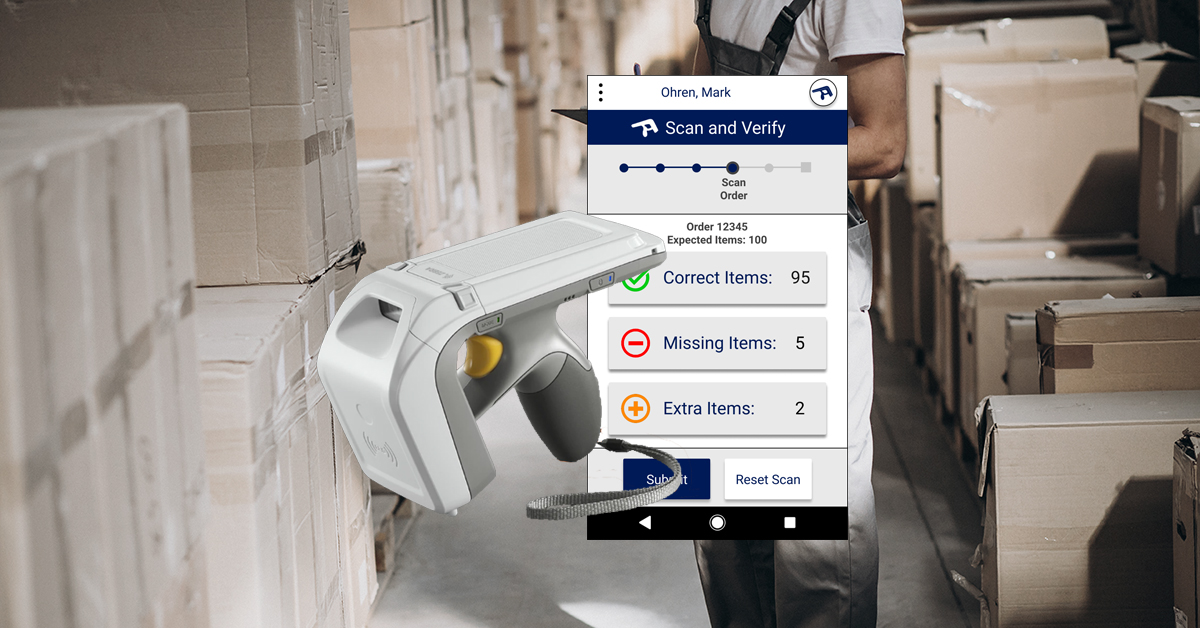
A case study in UX Research and Design For integrated workplace technologies
The Context
The Brief

Sticker Control is a Spanish startup that designs RFID tag systems for monitoring and tracking inventory items. Currently, one of the biggest uses of their system is for verifying the contents of orders in warehouses before shipment (and in some cases, upon return). However, many of their clients have been complaining about problems with the product/system. Sticker Control needed a UX specialist to research their users’ problems and provide insights into ways to reduce these customer complaints.
My Role

UX Researcher and Designer
As both a researcher and designer, I was responsible for every phase of the project: From planning, to client management, to field research, to prototyping and testing.
Phase One: Planning
Design Thinking
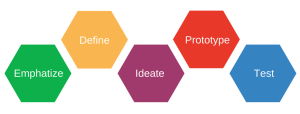
As a UX specialist guided by the principles of design thinking, I knew that before I even began to think about any possible solutions, I had to begin by truly understanding the problems.
Defining the Research Questions and Planning Research Methods

Before kicking off the discovery phase, I first had to define the main questions that would need to be answered in order to truly understand the users’ problems. For each question, I then defined what methods I would use to try to find an answer.
1. Who is Sticker Control and what is their mission?
Methods:
- Secondary Research
- Stakeholder Interviews
2. What is the product and how does it work?
Methods:
- Secondary Research
- Stakeholder Interviews
- Product Demo
- Independent Testing
3. Who are the users and why are they complaining?
Methods:
- Customer Complaint Analysis
- Customer and User Interviews
- Ethnography/Contextual Inquiry
- Usability Studies
Phase Two: Discovery
Secondary Research

The Company
By looking at their company website, YouTube channel, and LinkedIn page, I got a basic understanding of the company’s structure, its products, and its value proposition. I put together some further questions in preparation for the stakeholder interviews.
The Product
Having no background knowledge of RFID technology, I scoured the internet to see how it works: video demos, scientific papers, manufacturers websites, etc. I formulated more interview questions and also arranged for a more in-depth interview/demo with the Lead Developer
Stakeholder Interviews
Now having a basic understanding of the company, I arranged and conducted interviews with:
- The Head of Product
- The Technical Product Manager
- The Lead Developer
- The Graphic Designer / Front End Developer
Product Demo
After sitting down with the Lead Developer, I was able to understand and define the parts of the system as follows:
RFID Tags

These small stickers each contain a unique RFID code. They can be attached to products and subsequently used to locate said product and/or look up its details in the system.
The Scanner
Unlike traditional barcode scanners, the RFID scanner is capable of scanning simultaneously in all directions and can read dozens of tags per minute.
The Sticker Control App
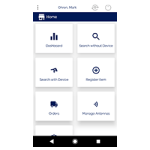
Sticker Control’s proprietary app can be connected to a specific RFID scanner and used to visualize and manage all of the RFID tagged items within the system.
Independent Testing
After the interviews and demo, I was able to get my own set of tags, scanner, and login for the APP. This allowed me to perform tests independently so that I could understand the system before visiting the clients for my contextual inquiries.
Customer Complaint Analysis
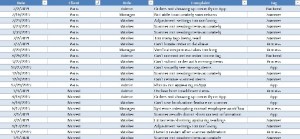
After understanding the company and the product, I had to understand the nature of the customers’ complaints. Working with the Head of Product, I made a spreadsheet with the most common complaints and tagged them with the date, company name, and appropriate categories.
Field Research
Paris Costumes

Sticker Control’s biggest client company by far, Paris Costumes is a company located on the outskirts of Madrid that provides costumes for theatre productions, films, and TV shows.
Interviews
As is often the case with B2B Products, the customer and manager are actually different roles within the client organization. Upon arriving to the client’s workplace, I conducted 7 interviews:
Customers (Manager Level)
- 2 Warehouse Managers
- Focus on high-level goals for the system’s implementation within warehouse
Users (Worker Level)
- 5 Warehouse Workers
- Focus on daily workflow and attitudinal data about the products current implementation
Ethnographic Study and Contextual Inquiry
After the initial interviews, I performed an ethnographic study in the customer’s warehouse over the course of several days. I shadowed and observed a set of workers while they went about their normal work, occasionally stopping to ask questions based on my observations.
Usability Studies
In addition to monitoring their overall workflow, I did specific usability testing with 3 of the workers in order to analyze the usability of Sticker Controls proprietary app. I gave the users several tasks and observed as they attempted to complete them within the app.
Phase Three: Definition
User Personas
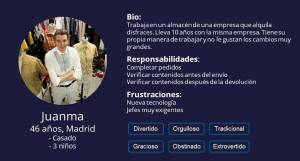
Because of the highly specialized nature of the tool, I felt it only necessary to create one user persona at this time. This Persona, Juanma, was based on the 5 workers who I had interviewed and observed during my field studies.
User Journey Mapping
Perhaps that most important tool to understand the problems in this specific project. Based on my ethnographic research, I was able to put together a journey map that showed many of the users’ pain points and could ultimately be used to understand and gain insights into many of the complaints that Sticker Control had been receiving from their customers
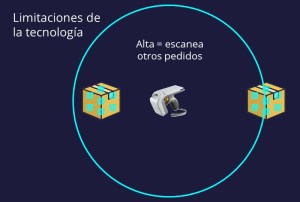
Understanding the System Limitations
After all of the research, I developed an understanding of the true limitations of the technology that had been causing many of the problems and would need to be taken into account for any possible solution

Problem Definition
1. Order Selection

In the current design, the process of selecting an order to start the verification process is long, unintuitive and unnecessarily complicated. Users must sort through a long list of order numbers until they recognize theirs.
2. Scan visualization

After scanning an order, all the user receives is information about the number of items and a long list of ID numbers. It is not easy to see which items are missing from the order or if there are any extra items that have scanned.
3. Scanner Calibration

Because of the technological limitations of the system, the scanner sensitivity must often be adjusted depending on the physical space. In the current design, this means exiting the process, going to the settings, changing an arbitrary number, starting the scan process over again, and hoping that the sensitivity is correct. If not, the process must be repeated until it is correct.
4. Manual Adjustments and TroubleShooting

If a scan comes back with extra or missing items, there is no way to manually add or remove them within the app. They must physically be added or removed from the space and the entire scan process repeated.
The Real Underlying Problem
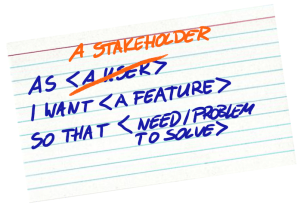
As is the case with many companies and digital products, Sticker Control has been designed with a focus on features and not on its users’ actual workflow.
Phase Four: Solution Design
Defining The Scope

Not in Scope:
- Physical Artifacts: Because Sticker Control does not manufacture the RFID tags or the scanners, the solution will not deal with the design of any physical parts of the system.
- Physical Spaces: Because of the fact the Sticker Control’s main company goal is to expand into a variety of industries and a variety of physical workspaces, the solution must not depend on the design or layout of physical spaces.
- Backend users: Because the majority of complaints were found to be related to the use of the system for order verifications, this solution will only focus on that specific workflow. For this project, the solution will not involve how orders/items are created or added to the system on the backend.
in Scope:
- The App: Sticker Control’s real product (and differentiator) is its proprietary app which is used for inventory management.
- Frontend Order Verification Process: Based on my discovery research and problem definitions, I have concluded that the most urgent problems to address are all related to the order verification process and the workflows of the principle users (warehouse workers).
Problem-Solution Mapping
Problem 1: Order Selection
How might we make it easier for users to select orders and initiate the verification process?
Solution
- Guided verification process with specific button on home screen
- Easy order select system with optional “parent tags” feature
Problem 2: Scan Visualization
After a scan, how might we make it clear to the user the status and results of their scan?
Solution
- Simple interface that displays order information and scanned items
- Items separated into 3 categories: Correct, Missing, Extra
Problem 3: SCANNER CALIBRATION
Taking into account the many potential physical space and technical limitations of the product, how might we allow for the user to more easily and dynamically calibrate the scanner to any given space?
Solution
- Feature for dynamic adjustment of scanner sensitivity without exiting the verification process
- Scanner sensitivity slider instead of arbitrary number
Problem 4: Manual Adjustments and Troubleshooting
How might we allow the user to manually change the contents of the order and troubleshoot without having to rescan?
Solution
- Interface for item visualization
- Manual add and remove buttons
- Localization and reporting features for each item
Sketching the New Flow
With the new solutions in mind, I worked with the client to sketch out a new flow for a guided order verification process within the app.
Prototyping
Wireframing (Low Fidelity)
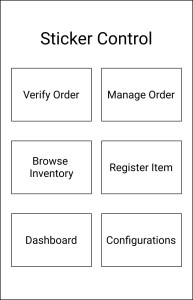
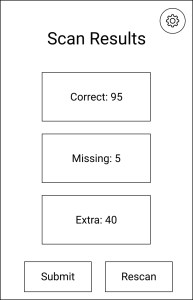
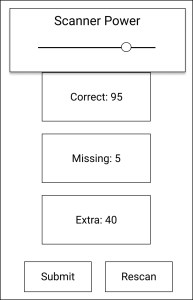
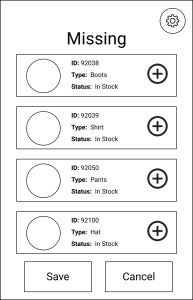
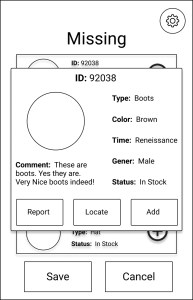
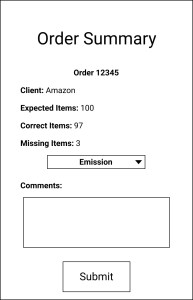
After I had more or less finalized the overall flow of the new design, I created low fidelity wireframes in Figma.
Remote Usability Testing and Flow Validation
Once I had finished the wireframes, I usability tested them and validated the flow remotely with 4 of the 5 users who were the subjects of my initial field studies. Results were positive overall, but I also found that I needed to make some slight changes in preparation for a higher fidelity prototype.
Prototyping (High Fidelity)
Again in Figma, I created a higher fidelity prototype that was more in-line with the current look and feel of Sticker Control’s real app.
1. Order Selection
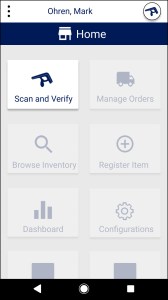
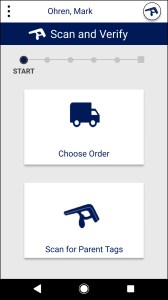
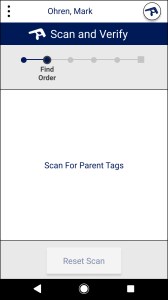
A simple button to start the process leads to first step of choosing the order. The user can either manually select order or scan for a parent tag to auto-choose the order.
2. Scan Visualization
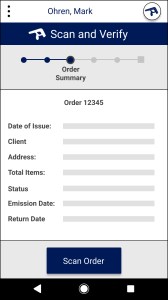
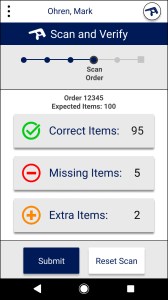
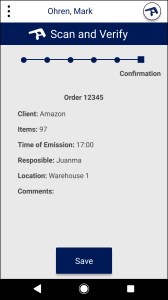
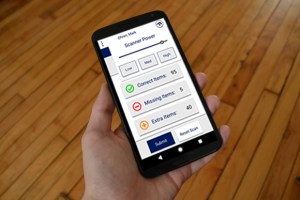
Order details are clearly visible before scan. After the scan, there is clear feedback about the items that are correct, missing, or extra. Upon submission, there is a clear summary of the scanned contents.
3. Scanner Calibration
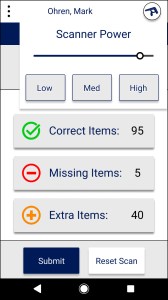
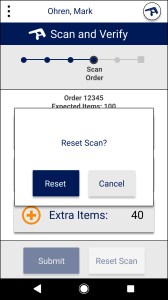
Scanner settings button added in the upper right corner so that scanner can be adjusted at any point in the process. It can be adjusted via the slider or the user can select from specific ‘high’, ‘medium’, and ‘low’ presets.
4. Manual Adjustments and Troubleshooting
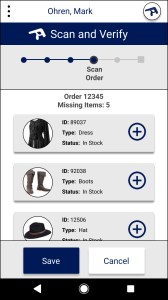
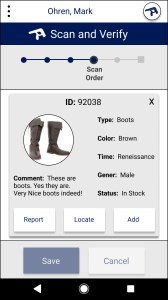
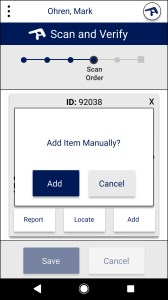
New user interface for item visualization. Includes manual add and remove buttons as well as features for reporting problems and localizing items using the scanners localization capabilities.
Phase Five: Validation
Hypothesis 1
Our new guided process will reduce average time for order verification and will result in fewer customer complaints.
VALIDATION METHODS
- A/B Usability Testing with Quantitative Time Measurements
- Customer Complaint Analysis
- User Interviews
Results
A/B Usability testing with current product vs. the high-fidelity prototype estimated 40% reduction in overall order verification time. Because of limitations of prototype, future tests are needed during actual development to further validate this finding.
*Note: this does not include time to locate items and fill order. It is simply a reduction in the process of scanning and verifying a given order.
Based on interviews, there was a dramatic improvement in the overall attitude towards the product. After release, there will need to be a subsequent customer complaint analysis to calculate reduction in workflow specific complaints.
Hypothesis 2
Our new interface for viewing scan results will be more intuitive and provide the user with a greater overall understanding of the current status of the order.
VALIDATION METHODS
- Usability Testing
- User Interviews
Results
There was a dramatic increase in customers understanding of the results of each scan as measured by correct answers to specific questions such as:
- What is the expected content of the order?
- How many items are correct, missing, extra?
Hypothesis 3
The new dynamic scanner calibration feature will provide for easier adjustment of scanner sensitivity and reduce overall errors related to physical artifact/space constraints.
VALIDATION METHODS
- Usability Testing
- User Interviews
Results
With new dynamic adjustment feature, users were able to adjust scanner sensitivity at any moment. This contributed greatly to the overall reduction in order verification time.
Further testing will be required once the new system is developed enough to connect to the actual scanner to measure reduction in overall errors and actual reduction in verification time.
Hypothesis 4
The new interface for adding, locating, and reporting specific items will proved for greater flexibility of use and will provide greater control for troubleshooting
VALIDATION METHODS
- Usability Testing
- User Interviews
Results
Usability testing showed successful ability to add, report, and located items in all participants. Interviews provided evidence of extremely positive about the overall user experience of the new interface
Future Testing Plan
As mentioned in the results for the above hypotheses, further testing will be needed during development once the system is actually connected to the scanners. Even if I am no longer involved with the company, I strongly encourage hiring a UX Researcher to carry out the following testing plan:
Agile Usability Testing
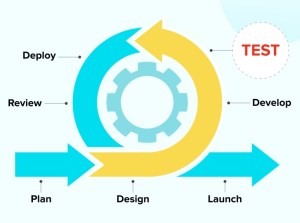
According to the world-famous Nielson Norman group, iterative usability testing only requires about 5-6 users to identify major usability problems. Therefore, throughout the development process, the client is should carry out a series of at least 4 small usability tests to guide successful development and answer the following research questions:
Phase 1: Order Selection
Is the user easily and successfully able to scan for specific parent tags in order to start the order verification process?
Phase 2: Scanning
Is the user easily and successfully able to scan a given order and visualize the results of the scan?
Phase 3: Scanner Calibration
Is the user able to use the system to adjust the scanner sensitivity to deal with any physical space constraints?
Phase 4: Manual Adjustments and Troubleshooting
For an order that is not correct, is the user able to use the system to successfully adjust, report, and localize items?
Customer Complaint Analysis
Just like what was done in the discovery phase, the company should compile and categorize user complaints after the development and launch of the new design. This will allow for the opportunity to quantitatively measure any changes in customer complaints.
Tracking Average Verification Times
Once the new design is actually implemented within the warehouse, additional studies should be done to determine average reduction in overall verification times. This could be linked to overall cost savings for the client companies which would in turn provide powerful support for Sticker Control’s Value proposition.
Conclusion and Reflections
Value For the client

Greater Understanding of the users
Through the creating of user personas, user journey mapping, and problem definitions, I have provided the client with a greater understanding of who their users are and how they use the product.
Improved User Workflow
With a design that actually takes into account the users’ role, workflow, and physical environment, the users’ paint points will be greatly reduced and the system will subsequently be much easier to implement for new clients.
Reduced customer complaints
As was the original goal of the project, reduced pain points = reduced customer complaints. Reduced customer complaints = better product reputation and, ideally, increased future clients
Future validation plan to use during development
Although the project officially ended with the developer handoff, I provided the client with an understanding of the various hypotheses and an understanding of various ways to measure the product’s success during development and after release.
Personal Learnings

Complexity of B2B PRODUCTS
When designing B2B products, we must think not only about the high-level objectives of the company as a whole, but also the specific roles, objectives, and workflow of the employees within the company. We must learn to balance the demands from the customer (management level) with the real needs of the users (employee level).
Integrating New workplace technologies
Introducing modern technology into more traditional workplaces (where processes have often remained unchanged for decades) can be met with great resistance. I believe the best method for mitigating said resistance is two-fold:
- Make sure the new technology takes into account the current system, roles, mental models, etc. and actively work to minimize large, frustrating changes to users workflows.
- Always establish communication channels with client company and actual users to make sure that they feel heard and are involved in the design and development of the new system.
 Mark Ohren